
Reset Instructions for AirTies 4971
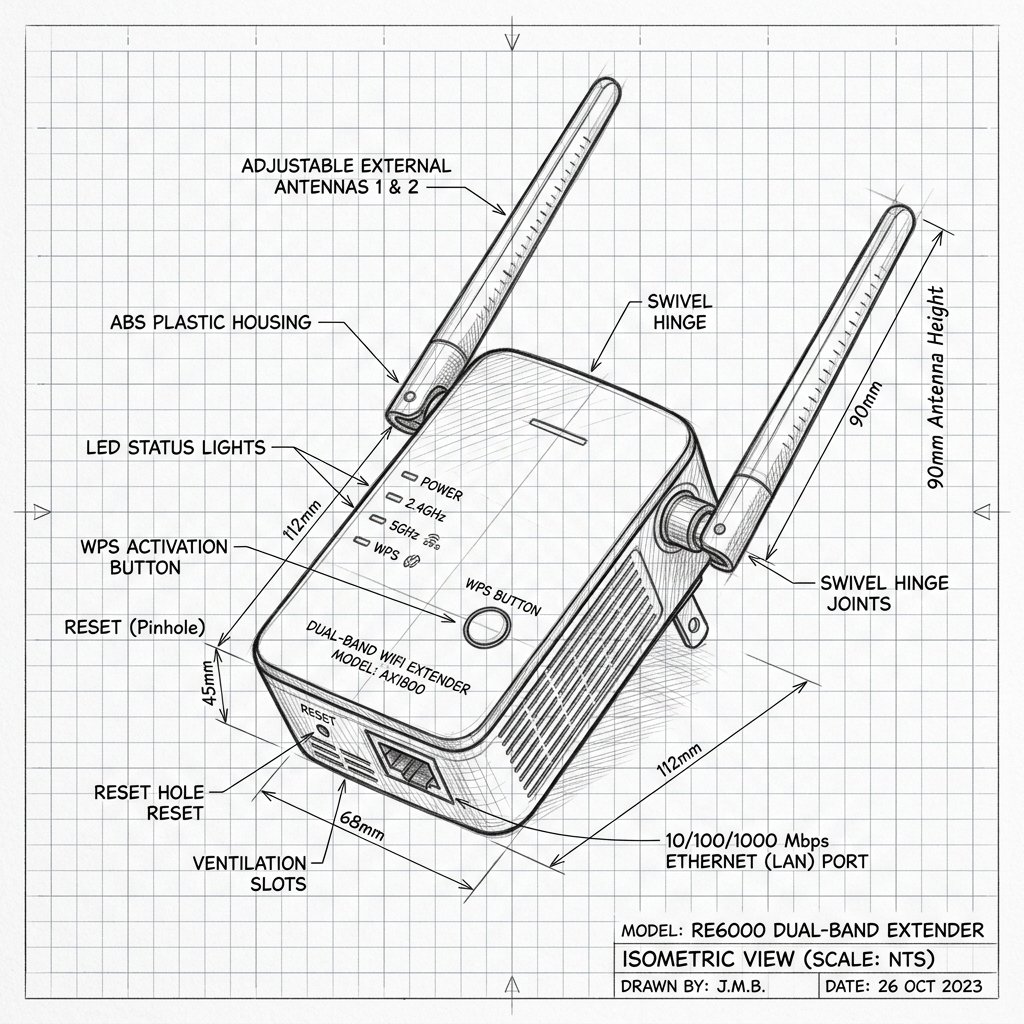 Dual-Antenna Range Extender
Hardware Reset Reference
AirTies AirTies 4971 Reset Location
Locate the dedicated physical Reset pinhole or recessed button shown in the diagram. Use a paperclip or SIM eject tool to press and hold according to the steps below.
Reset Button / Pinhole
LED Blink Confirmation
Soft Reset (Power Cycle)
- Unplug the extender’s power cord from the wall outlet.
- Wait about 10–15 seconds.
- Plug the power cord back in and wait for the LEDs to stabilize (power LED green, status LED connected or ready).
Factory Reset (Restore Defaults)
- Ensure the extender is powered on and connected to a working outlet.
- Locate the recessed Reset button on the back of the chassis.
- Use a paperclip or pin to press and hold the reset button for about 5–10 seconds until the LEDs change state or blink, indicating a reset sequence has started.
- Release the button and wait a couple of minutes for the extender to reboot and restore factory settings.
- After reset, the extender is unpaired and must be set up again with Smart Home Manager.