
Netgear Nighthawk AX8 (EAX80) Setup Guide
 Desktop High-Power Tower
Hardware Layout & Ports
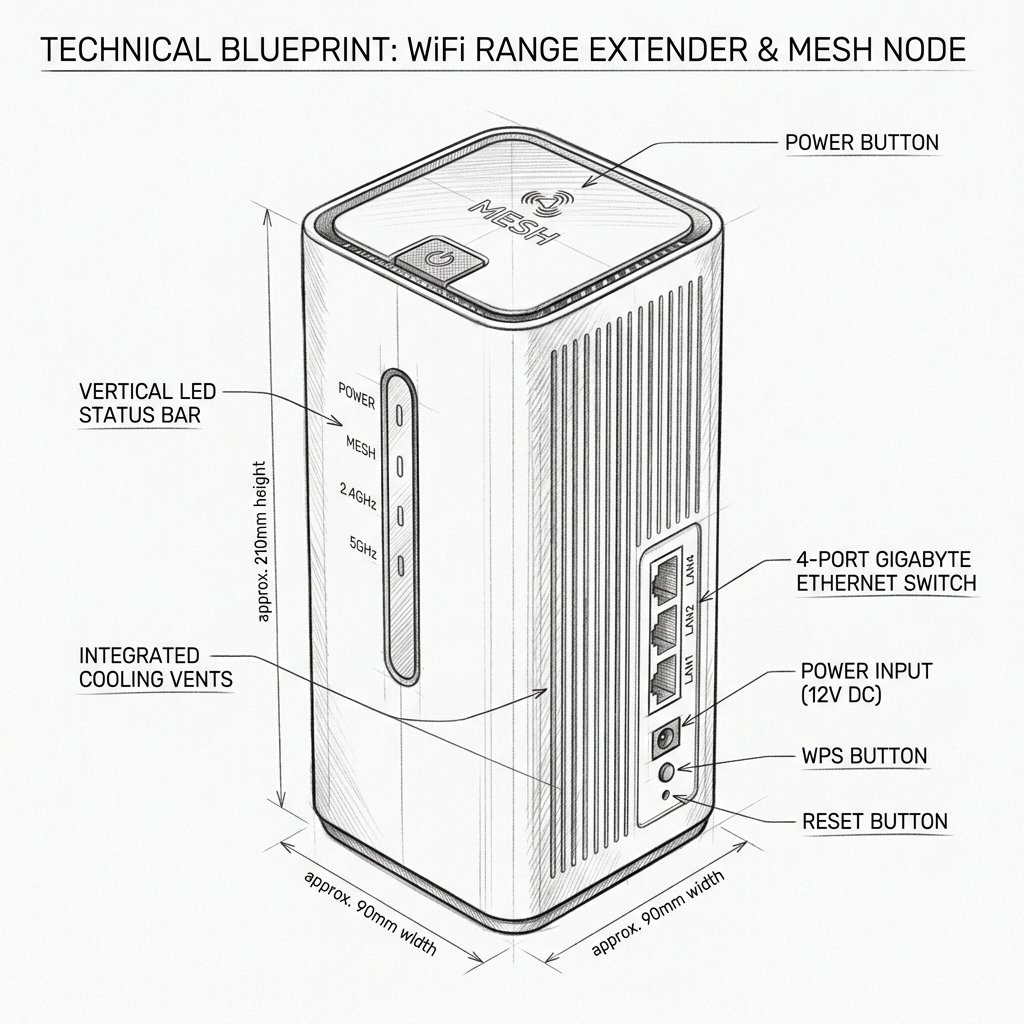
Netgear EAX80 Diagram
Reference this technical blueprint during setup to locate the power input, status LED indicators, one-touch WPS pairing button, and Ethernet port on your device.
Status LEDs
WPS Button
Reset Pinhole
The NETGEAR Nighthawk AX8 EAX80 is an AX6000 Wi-Fi 6 mesh extender that fills Wi-Fi dead spots, adds wired ports for high-priority devices, and supports seamless roaming. This guide provides short, actionable steps for real-world setup.
Quick 3-Step Checklist
- Restart: Unplug the extender, wait 15 seconds, plug it back in.
- Reconnect: Ensure your phone is connected to the extender’s Wi-Fi before opening the app or browser.
- Verify router internet: Connect a phone directly to the router Wi-Fi and run a quick speed test.
Product Snapshot
- Standard: Wi-Fi 6 (802.11ax), AX6000, 8-stream performance.
- Form: Desktop mesh extender (internal antennas).
- Useful for: Removing dead spots, adding wired ports for gaming/streaming, enabling smooth roaming.
Recommended Setup (Nighthawk App)
- Power and placement: Plug the EAX80 into a power outlet near your router for initial setup. Wait until the Power LED becomes steady.
- Connect phone to extender: Open Wi-Fi on your phone and connect to the extender’s default SSID (usually a
NETGEAR_EXT-style name). - Install and open the app: Install the NETGEAR Nighthawk App. Sign in or create a NETGEAR account.
Reality Check: If the app can’t find the extender and spins for >2 minutes, force-close the app, toggle Bluetooth, or switch to browser setup.
- Guided setup: In the app tap Set Up a New Device → Range Extender, then choose EAX80.
- Connect to router: Select your router’s Wi-Fi name (SSID) and enter the password exactly. Choose "one Wi-Fi name" for seamless roaming.
- Optimize placement: Move the EAX80 roughly halfway between the router and the trouble area. Aim for 2–3 bars of router signal at the extender’s spot.
- Final test: Run a speed test in the previously weak area to confirm improvement.
Alternative Setup Methods
Browser Setup (mywifiext)
- Plug in the EAX80 near your router and wait for the Power LED to be steady.
- Connect your device to the extender’s default Wi-Fi network.
- In your browser, visit
http://mywifiext.net,http://mywifiext.local, or192.168.1.250. - Follow the on-screen wizard to finish the configuration.
WPS Quick Pair
- Plug in the extender and wait for the Power LED to stabilize.
- Press the WPS button on the EAX80 until the WPS LED blinks.
- Within two minutes, press the WPS button on your router.